
Laravel Telescope
简介
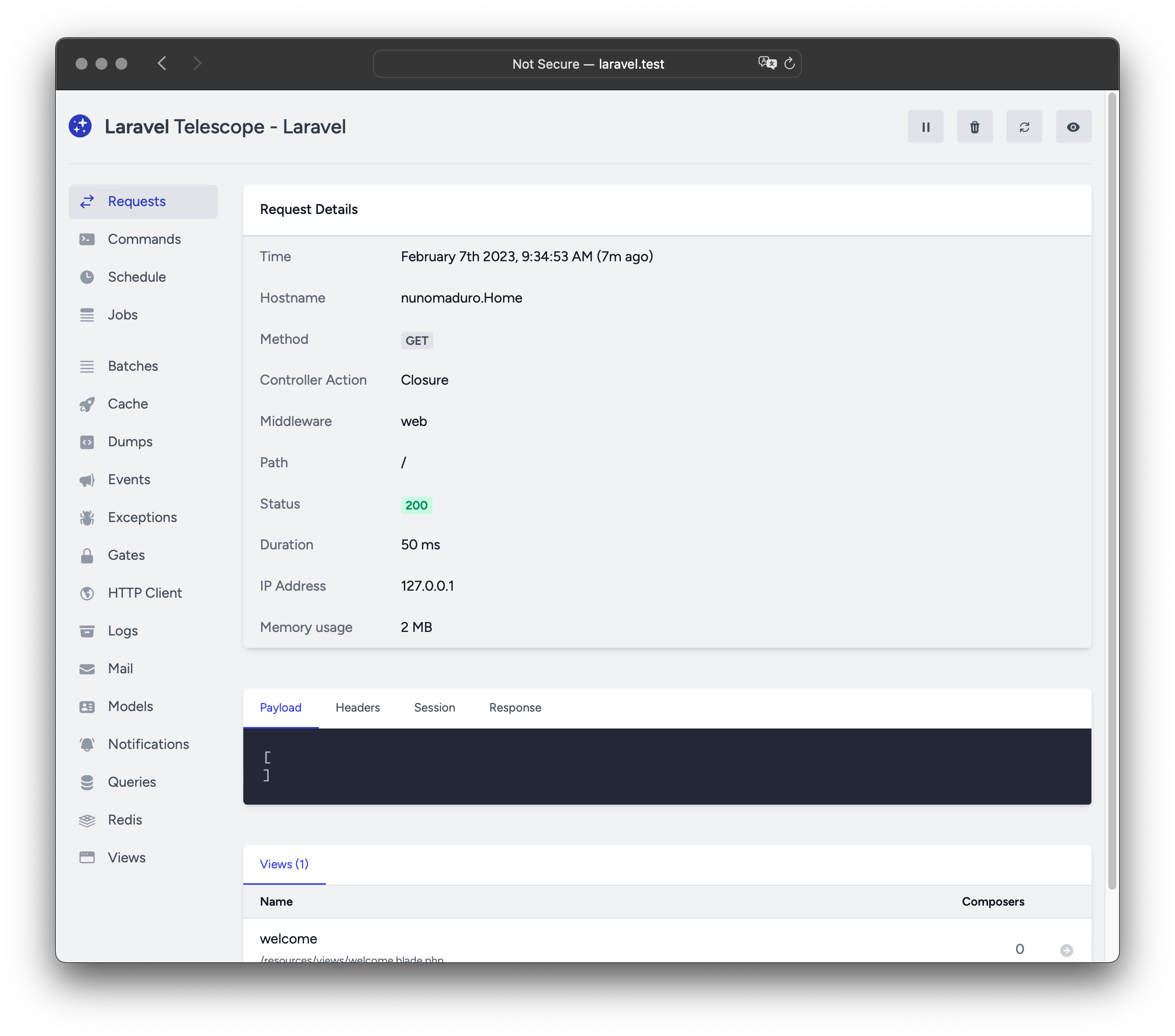
Laravel Telescope 是你本地 Laravel 开发环境的绝佳伴侣。Telescope 提供了对应用程序传入请求、异常、日志条目、数据库查询、队列作业、邮件、通知、缓存操作、计划任务、变量转储等的洞察。
安装
你可以使用 Composer 包管理器将 Telescope 安装到你的 Laravel 项目中:
composer require laravel/telescope安装 Telescope 后,使用 telescope:install Artisan 命令发布其资源和迁移文件。安装 Telescope 后,你还应运行 migrate 命令来创建存储 Telescope 数据所需的表:
php artisan telescope:install

php artisan migrate
最后,你可以通过 /telescope 路由访问 Telescope 仪表盘。
仅本地安装
如果你计划仅使用 Telescope 辅助本地开发,可以使用 --dev 标志安装 Telescope:
composer require laravel/telescope --dev

php artisan telescope:install

php artisan migrate
运行 telescope:install 后,应从应用程序的 bootstrap/providers.php 配置文件中删除 TelescopeServiceProvider 服务提供者的注册。相反,在 App\Providers\AppServiceProvider 类的 register 方法中手动注册 Telescope 的服务提供者。我们将在注册提供者之前确保当前环境为 local:
/**
 * 注册任意应用服务。
 */
public function register(): void
{
    if ($this->app->environment('local') && class_exists(\Laravel\Telescope\TelescopeServiceProvider::class)) {
        $this->app->register(\Laravel\Telescope\TelescopeServiceProvider::class);
        $this->app->register(TelescopeServiceProvider::class);
    }
}
最后,你还应通过将以下内容添加到 composer.json 文件来防止 Telescope 包被自动发现:
"extra": {
    "laravel": {
        "dont-discover": [
            "laravel/telescope"
        ]
    }
},
配置
发布 Telescope 的资源后,其主配置文件将位于 config/telescope.php。此配置文件允许你配置观察器选项。每个配置选项都包含其用途的说明,因此请务必彻底浏览此文件。
如果需要,你可以使用 enabled 配置选项完全禁用 Telescope 的数据收集:
'enabled' => env('TELESCOPE_ENABLED', true),数据修剪
如果不进行修剪,telescope_entries 表会非常快速地累积记录。为了缓解这个问题,你应该计划每天运行 telescope:prune Artisan 命令:
use Illuminate\Support\Facades\Schedule;

Schedule::command('telescope:prune')->daily();
默认情况下,将修剪所有超过 24 小时的条目。你可以在调用命令时使用 hours 选项来确定 Telescope 数据的保留时间。例如,以下命令将删除所有超过 48 小时前创建的记录:
use Illuminate\Support\Facades\Schedule;

Schedule::command('telescope:prune --hours=48')->daily();
仪表盘授权
Telescope 仪表盘可以通过 /telescope 路由访问。默认情况下,你只能在 local 环境中访问此仪表盘。在你的 app/Providers/TelescopeServiceProvider.php 文件中,有一个授权门定义。此授权门控制非本地环境中对 Telescope 的访问。你可以根据需要修改此门以限制对你的 Telescope 安装的访问:
use App\Models\User;

/**
 * 注册 Telescope 门。
 *
 * 此门决定谁可以在非本地环境中访问 Telescope。
 */
protected function gate(): void
{
    Gate::define('viewTelescope', function (User $user) {
        return in_array($user->email, [
            'taylor@laravel.com',
        ]);
    });
}
WARNING
你应确保在生产环境中将 APP_ENV 环境变量更改为 production。否则,你的 Telescope 安装将公开可用。
升级 Telescope
当升级到 Telescope 的新主要版本时,仔细阅读升级指南非常重要。
此外,当升级到任何新的 Telescope 版本时,你应重新发布 Telescope 的资源:
php artisan telescope:publish为了保持资源最新并避免未来升级中的问题,你可以将 vendor:publish --tag=laravel-assets 命令添加到应用程序 composer.json 文件的 post-update-cmd 脚本中:
{
    "scripts": {
        "post-update-cmd": [
            "@php artisan vendor:publish --tag=laravel-assets --ansi --force"
        ]
    }
}
过滤
条目
你可以通过 App\Providers\TelescopeServiceProvider 类中定义的 filter 闭包来过滤 Telescope 记录的数据。默认情况下,此闭包在 local 环境中记录所有数据,在所有其他环境中记录异常、失败的作业、计划任务和带有监控标签的数据:
use Laravel\Telescope\IncomingEntry;
use Laravel\Telescope\Telescope;

/**
 * 注册任意应用服务。
 */
public function register(): void
{
    $this->hideSensitiveRequestDetails();

    Telescope::filter(function (IncomingEntry $entry) {
        if ($this->app->environment('local')) {
            return true;
        }

        return $entry->isReportableException() ||
            $entry->isFailedJob() ||
            $entry->isScheduledTask() ||
            $entry->isSlowQuery() ||
            $entry->hasMonitoredTag();
    });
}
批次
filter 闭包过滤单个条目的数据,而 filterBatch 方法可用于注册一个闭包,过滤给定请求或控制台命令的所有数据。如果闭包返回 true,则所有条目都由 Telescope 记录:
use Illuminate\Support\Collection;
use Laravel\Telescope\IncomingEntry;
use Laravel\Telescope\Telescope;

/**
 * 注册任意应用服务。
 */
public function register(): void
{
    $this->hideSensitiveRequestDetails();

    Telescope::filterBatch(function (Collection $entries) {
        if ($this->app->environment('local')) {
            return true;
        }

        return $entries->contains(function (IncomingEntry $entry) {
            return $entry->isReportableException() ||
                $entry->isFailedJob() ||
                $entry->isScheduledTask() ||
                $entry->isSlowQuery() ||
                $entry->hasMonitoredTag();
            });
    });
}
标签
Telescope 允许你通过"标签"搜索条目。通常,标签是 Eloquent 模型类名或已验证用户 ID,Telescope 会自动将其添加到条目中。有时,你可能希望将自定义标签附加到条目中。为此,你可以使用 Telescope::tag 方法。tag 方法接受一个闭包,该闭包应返回一个标签数组。闭包返回的标签将与 Telescope 自动附加到条目的任何标签合并。通常,你应在 App\Providers\TelescopeServiceProvider 类的 register 方法中调用 tag 方法:
use Laravel\Telescope\EntryType;
use Laravel\Telescope\IncomingEntry;
use Laravel\Telescope\Telescope;

/**
 * 注册任意应用服务。
 */
public function register(): void
{
    $this->hideSensitiveRequestDetails();

    Telescope::tag(function (IncomingEntry $entry) {
        return $entry->type === EntryType::REQUEST
            ? ['status:'.$entry->content['response_status']]
            : [];
    });
}
可用观察器
Telescope 的"观察器"在请求或控制台命令执行时收集应用程序数据。你可以自定义要在 config/telescope.php 配置文件中启用的观察器列表:
'watchers' => [
    Watchers\CacheWatcher::class => true,
    Watchers\CommandWatcher::class => true,
    // ...
],
某些观察器还允许你提供额外的自定义选项:
'watchers' => [
    Watchers\QueryWatcher::class => [
        'enabled' => env('TELESCOPE_QUERY_WATCHER', true),
        'slow' => 100,
    ],
    // ...
],
批次观察器
批次观察器记录有关排队的批次的信息,包括作业和连接信息。
缓存观察器
缓存观察器在缓存键被命中、未命中、更新和遗忘时记录数据。
命令观察器
命令观察器在执行 Artisan 命令时记录参数、选项、退出代码和输出。如果你希望排除某些命令被观察器记录,可以在 config/telescope.php 文件中的 ignore 选项中指定该命令:
'watchers' => [
    Watchers\CommandWatcher::class => [
        'enabled' => env('TELESCOPE_COMMAND_WATCHER', true),
        'ignore' => ['key:generate'],
    ],
    // ...
],
转储观察器
转储观察器在 Telescope 中记录并显示你的变量转储。使用 Laravel 时,变量可以使用全局 dump 函数进行转储。转储观察器标签页必须在浏览器中打开才能记录转储,否则转储将被观察器忽略。
事件观察器
事件观察器记录你的应用程序分派的任何事件的负载、监听器和广播数据。Laravel 框架的内部事件会被事件观察器忽略。
异常观察器
异常观察器记录你的应用程序抛出的任何可报告异常的数据和堆栈跟踪。
门观察器
门观察器记录你的应用程序进行的门和策略检查的数据和结果。如果你希望排除某些能力被观察器记录,可以在 config/telescope.php 文件中的 ignore_abilities 选项中指定它们:
'watchers' => [
    Watchers\GateWatcher::class => [
        'enabled' => env('TELESCOPE_GATE_WATCHER', true),
        'ignore_abilities' => ['viewNova'],
    ],
    // ...
],
HTTP 客户端观察器
HTTP 客户端观察器记录你的应用程序发出的传出 HTTP 客户端请求。
作业观察器
作业观察器记录你的应用程序分派的任何作业的数据和状态。
日志观察器
日志观察器记录你的应用程序写入的任何日志数据。
默认情况下,Telescope 仅记录 error 级别及以上的日志。但是,你可以修改应用程序 config/telescope.php 配置文件中的 level 选项来更改此行为:
'watchers' => [
    Watchers\LogWatcher::class => [
        'enabled' => env('TELESCOPE_LOG_WATCHER', true),
        'level' => 'debug',
    ],

    // ...
],
邮件观察器
邮件观察器允许你以浏览器内预览的形式查看你的应用程序发送的邮件及其关联数据。你也可以将邮件下载为 .eml 文件。
模型观察器
模型观察器在分派 Eloquent 模型事件时记录模型更改。你可以通过观察器的 events 选项指定应记录哪些模型事件:
'watchers' => [
    Watchers\ModelWatcher::class => [
        'enabled' => env('TELESCOPE_MODEL_WATCHER', true),
        'events' => ['eloquent.created*', 'eloquent.updated*'],
    ],
    // ...
],
如果你希望记录给定请求期间水化的模型数量,启用 hydrations 选项:
'watchers' => [
    Watchers\ModelWatcher::class => [
        'enabled' => env('TELESCOPE_MODEL_WATCHER', true),
        'events' => ['eloquent.created*', 'eloquent.updated*'],
        'hydrations' => true,
    ],
    // ...
],
通知观察器
通知观察器记录你的应用程序发送的所有通知。如果通知触发了邮件并且你已启用邮件观察器,则该邮件也将在邮件观察器屏幕上可供预览。
查询观察器
查询观察器记录你的应用程序执行的所有查询的原始 SQL、绑定和执行时间。观察器还将任何慢于 100 毫秒的查询标记为 slow。你可以使用观察器的 slow 选项自定义慢查询阈值:
'watchers' => [
    Watchers\QueryWatcher::class => [
        'enabled' => env('TELESCOPE_QUERY_WATCHER', true),
        'slow' => 50,
    ],
    // ...
],
Redis 观察器
Redis 观察器记录你的应用程序执行的所有 Redis 命令。如果你使用 Redis 进行缓存,缓存命令也将由 Redis 观察器记录。
请求观察器
请求观察器记录与应用程序处理的任何请求关联的请求、标头、会话和响应数据。你可以通过 size_limit(以千字节为单位)选项限制记录的响应数据:
'watchers' => [
    Watchers\RequestWatcher::class => [
        'enabled' => env('TELESCOPE_REQUEST_WATCHER', true),
        'size_limit' => env('TELESCOPE_RESPONSE_SIZE_LIMIT', 64),
    ],
    // ...
],
调度观察器
调度观察器记录你的应用程序运行的任何计划任务的命令和输出。
视图观察器
视图观察器记录渲染视图时使用的视图名称、路径、数据和"组合器"。
显示用户头像
Telescope 仪表盘显示保存给定条目时已验证用户的头像。默认情况下,Telescope 使用 Gravatar 网络服务检索头像。但是,你可以通过在 App\Providers\TelescopeServiceProvider 类中注册回调来自定义头像 URL。回调将接收用户的 ID 和电子邮件地址,并应返回用户的头像图片 URL:
use App\Models\User;
use Laravel\Telescope\Telescope;

/**
 * 注册任意应用服务。
 */
public function register(): void
{
    // ...

    Telescope::avatar(function (?string $id, ?string $email) {
        return ! is_null($id)
            ? '/avatars/'.User::find($id)->avatar_path
            : '/generic-avatar.jpg';
    });
}